
Understanding Personas
Overview
Personas represent different types of stakeholders who might evaluate your bid. This guide explains how to create and use them to improve your bid’s appeal to key decision-makers.
What Are Personas?
Personas are profiles of stakeholder types who might evaluate your bid;, including their interests and how important they are to the evaluation.
Examples: Technical evaluator, Business decision maker, Procurement specialist, End user representative, Finance manager
Understanding Personas in Bid Bot
How Personas Work:
- Alignment: How well your bid appeals to each persona type
- Weighted Scores: Scores adjusted by persona importance
- Coverage: Whether you address different stakeholder concerns
Persona Weightings: Personas can have different importance (high/medium/low), affecting how scores are calculated.
Creating Personas
When to Create Your Own
Create custom when:
- You know specific stakeholders who will evaluate
- Working in industries with standard stakeholder types (e.g., public sector)
- Your organisation has identified key personas from past successful bids
- RFP provides information about evaluators
Use AI generation when:
- Unknown stakeholders
- Need a starting point to refine
- Time-constrained
Recommended Hybrid Approach:
- Generate personas using AI
- Review against known stakeholders
- Customise and refine to match reality
- Set appropriate weightings
- Save for reuse
How to Create
Method 1: AI Generation (Recommended)
- Navigate to the Report page for a bid question
- Find the Personas section
- Click the Create button
- On the Generate tab:
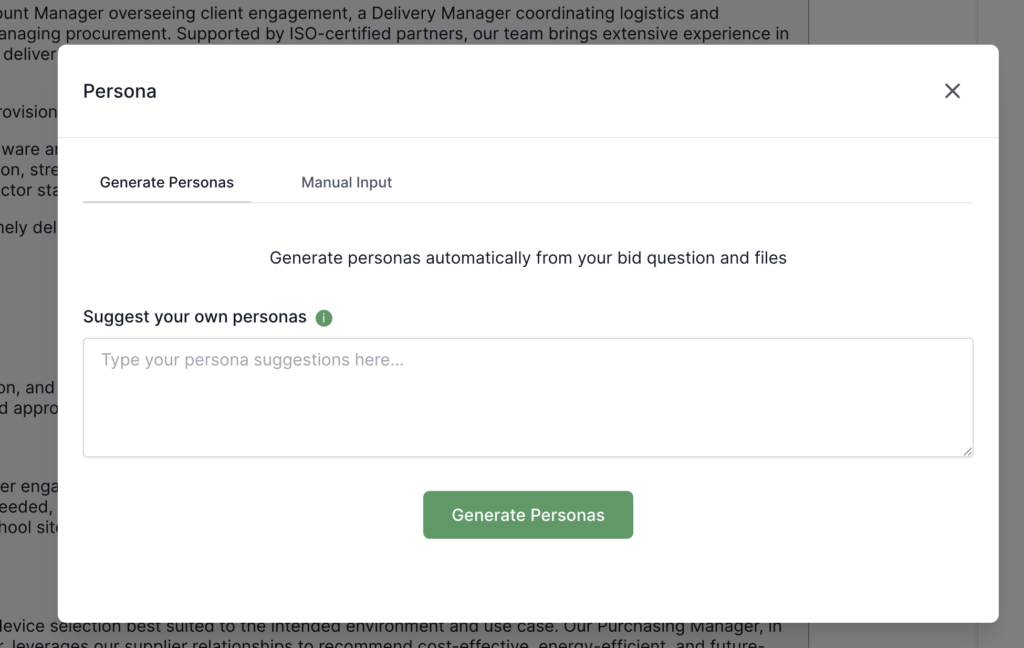
- Optionally enter stakeholder hints (e.g., “Technical lead, procurement manager”)
- Or leave blank for AI to identify just from the bid content and files
- Click Generate
- Review generated personas
- Customise (switch to Manual tab or edit directly):
- Edit name, role, description
- Add/remove categories and questions
- Adjust weightings
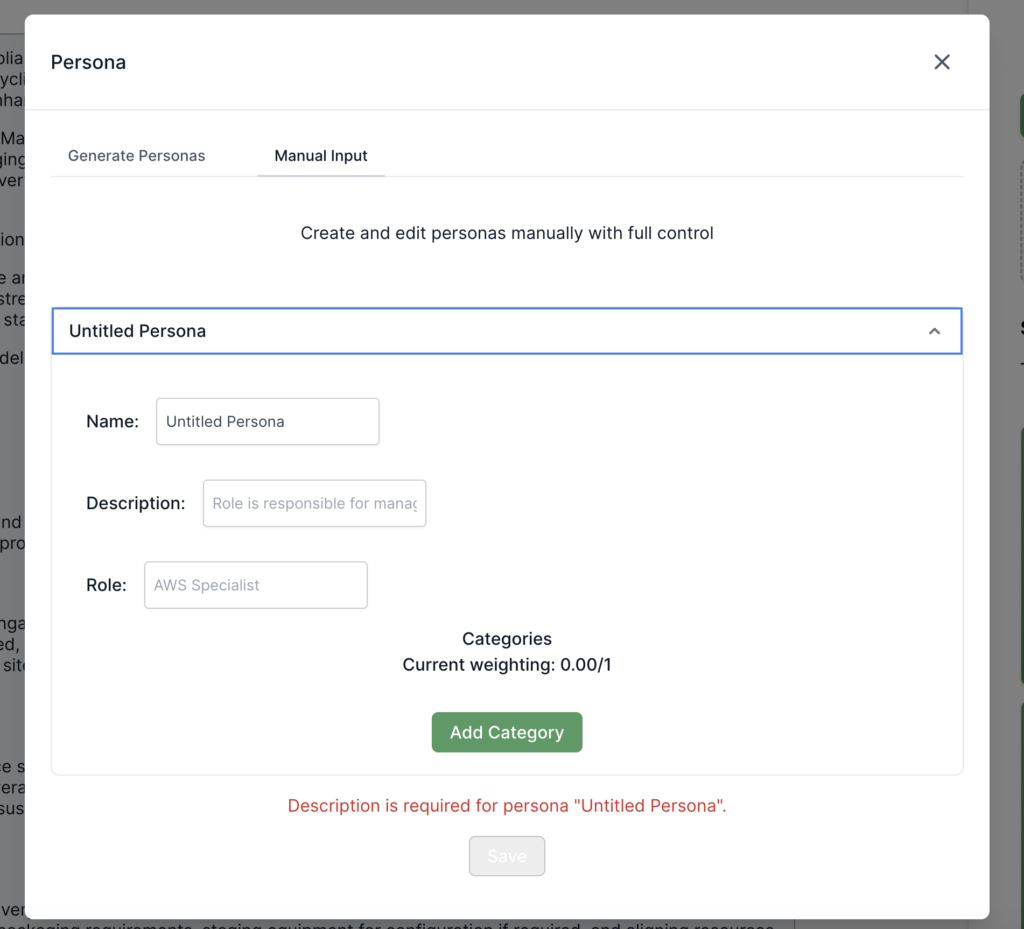
- Ensure all weightings sum to 1.0
- Click Save
Method 2: Manual Creation
- Navigate to Report → Personas → Create → Manual tab
- For each persona:
- Enter Name (e.g., “Technical Evaluator”)
- Enter Role (e.g., “Technical Lead”)
- Enter Description (what they care about)
- Click Add Category (e.g., “Technical Evaluation”)
- Within each category, click Add Question
- For each question: Enter question text, description, weighting (0-1)
- Ensure all question weightings sum to 1.0 within each category
- Set persona weightings when using in reports
- Click Save
Creating Effective Personas
Guidelines:
- Be specific (e.g., “NHS IT Director” not “Person who evaluates”)
- Understand what each persona cares about
- Match reality when possible
- Weight by actual influence
- Define clear evaluation categories
Example Good Persona:
- Name: “John Smith”
- Role: “Technical Lead”
- Description: “Evaluates technical architecture, scalability, security, and implementation methodology. Cares about technical depth and best practices.”
Example Poor Persona:
- Name: “Evaluator”
- Role: “Person”
- Description: “Looks at the bid”
Important Notes
- Persona weightings: Set when using personas in reports (importance of each persona)
- Category weightings: Within each persona (importance of each category)
- Question weightings: Within each category (importance of each question)
- All question weightings within a category must sum to 1.0
- Multiple personas can be used together
Working with Personas
Using Personas
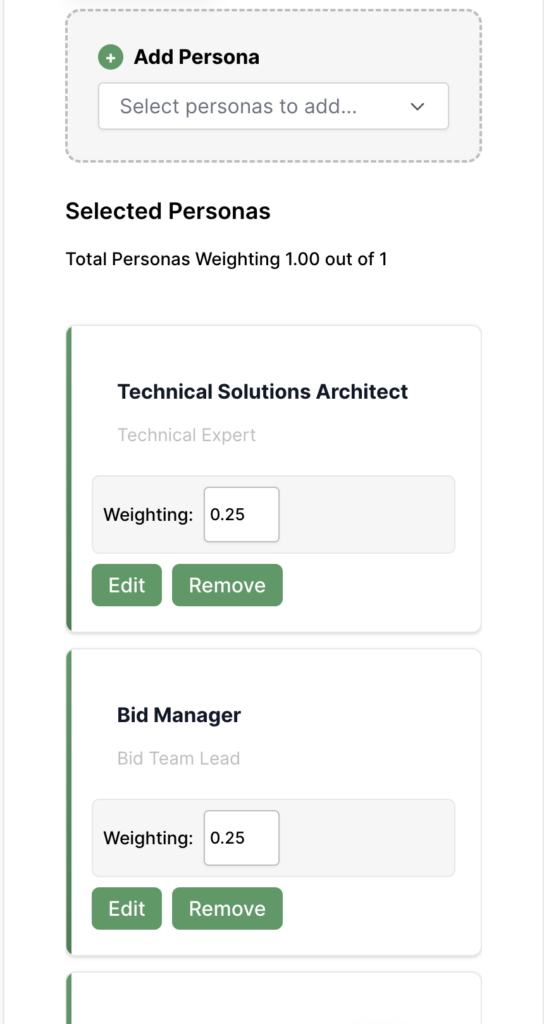
- Navigate to Report → Personas section
- Select personas to use
- Set weightings for each
- Enable Personas in report generation
- Click Generate Report
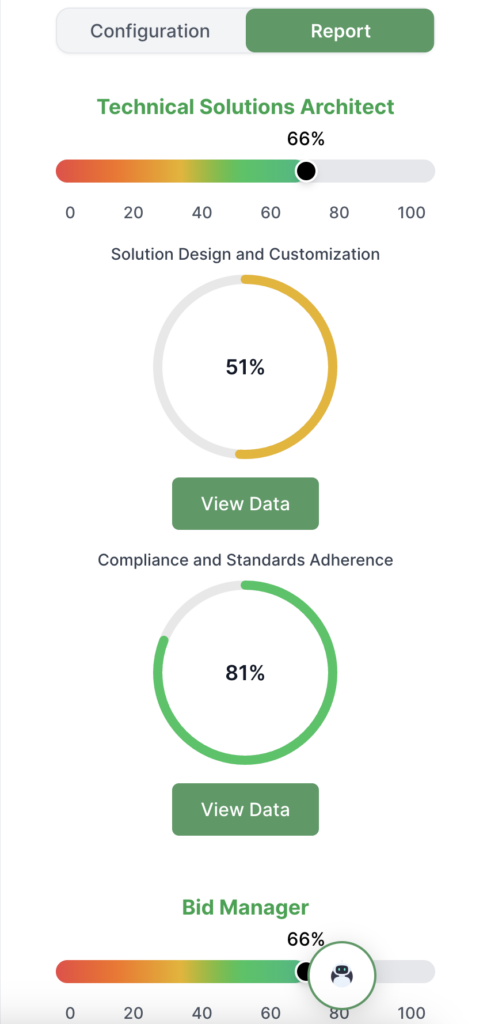
- Review scores for each persona
Persona reports show:
- Individual scores per persona
- Weighted average (adjusted by importance)
- Persona breakdown
- Alignment analysis
Best Practices
Understanding Your Audience
- Identify key personas
- Understand what each cares about
- Tailor content and language
- Balance appeal across personas
Setting Weightings
- Prioritize decision-makers
- Weight by influence on the decision
- Don’t put all the weight on one persona
- Adjust as you learn more
Writing for Multiple Personas
- Combine technical and business language
- Cover technical and commercial aspects
- Include both high-level and detailed info
- Show value from multiple perspectives
Improving Persona Alignment
- Review your Personas Report
- Understand what low-scoring personas care about
- Add content addressing their interests
- Adjust language for each persona type
- Regenerate reports to verify improvements
Understanding Scores
- High (80+): Strong appeal
- Medium (50-79): Moderate, could improve
- Low (<50): Weak, needs improvement
Weighted average considers individual scores, persona weightings, and overall effectiveness.
Common Mistakes
- Ignoring some personas: Address all relevant personas
- Incorrect weightings: Based on actual influence
- Generic content: Tailor to specific interests
Troubleshooting
- Low Persona Scores: Review which scores are low, understand their interests, add targeted content, and adjust language.
- Personas Not Available: Check if created/generated, generate if needed, contact support if missing, ensure selected before generating.
- Weightings Not Working: Verify settings, ensure they add up correctly, check all selected personas have weightings, and try regenerating.