
How to answer plan and structure bid responses
In this training guide, we will show you how to answer plan on the platform, using a question with the keywords based on experience, methodology and evidence. We will show how to break the question down, how to answer plan, and how to structure/wireframe and then review to add in more information, prior to writing your first draft.
Step 1 – understanding the question
You should have already of set up your bid at this point. If you have not, then visit this article – https://www.bid-bot.co.uk/knowledge-base/bid-analysis-set-up-how-to-set-up-your-bid/
You need to break down and interpret what the question is really asking — identifying the key words is an important part of this process.
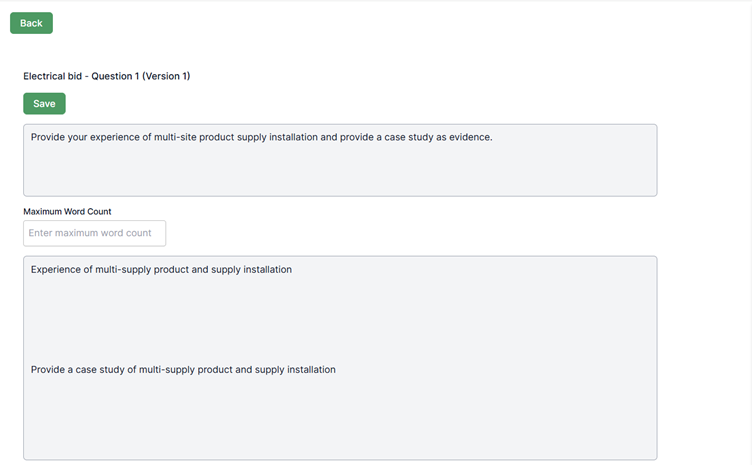
Below, we’ve broken down the keywords in two different ways: first manually, and then using the AI Helper.
Option 1 – Manual (Human) Approach
In this example, I’ve identified that there are two key elements within the question: “experience” and “evidence”.
Option 2 – Using our AI Helper
Input your text into the AI helper. You can open the AI helper by clicking on the bottom right-hand side Bid Bot logo.
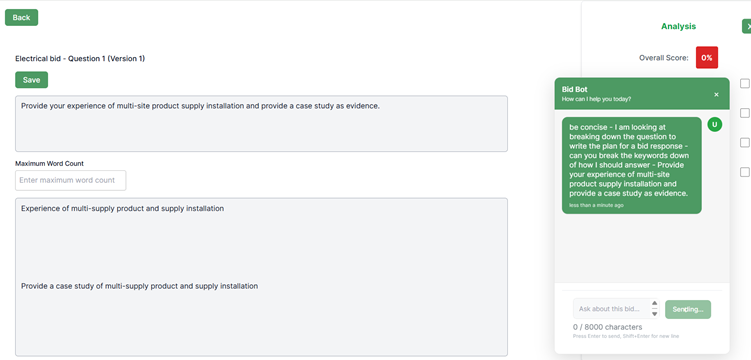
The output can be seen in the AI Helper panel on the right-hand side. It has identified the experience overview, the approach to the multi-site product and supply installation, and the case study. This matches how I would have broken down the first “experience” stage myself — it’s great to see that the AI Helper has done this automatically.
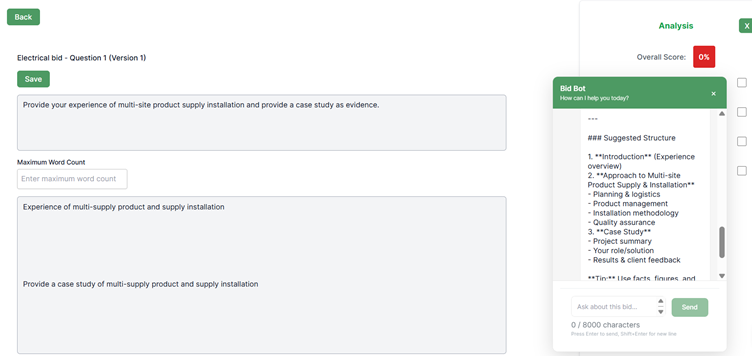
Insert the Suggested Structure Based on the Question’s Key Words
Using the AI Helper keyword breakdown, you can generate the basic framework for your answer plan and overall structure.
This forms the foundation of your answer planning process.
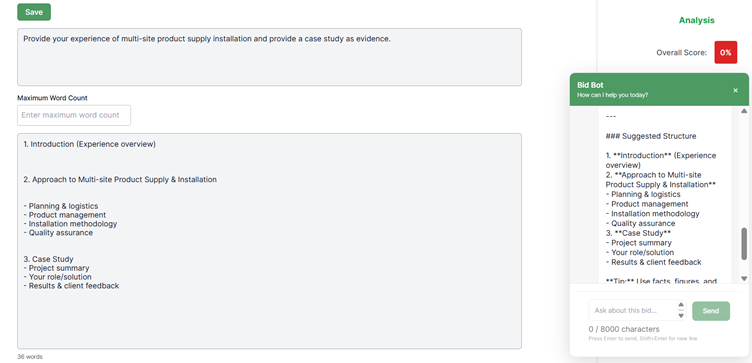
Including Compliance Points in Your Answer Planning
Ensure that your key compliance points for each response are captured within your answer plan and added as requirement reviews. While the AI reviews objectively, you may identify additional elements from your own experience that aren’t explicitly stated in the question but still need to be included.
For guidance on creating, editing, and adding requirements, see the knowledge article here.
Human Input or AI Helper Assistance for Building Answer Plans
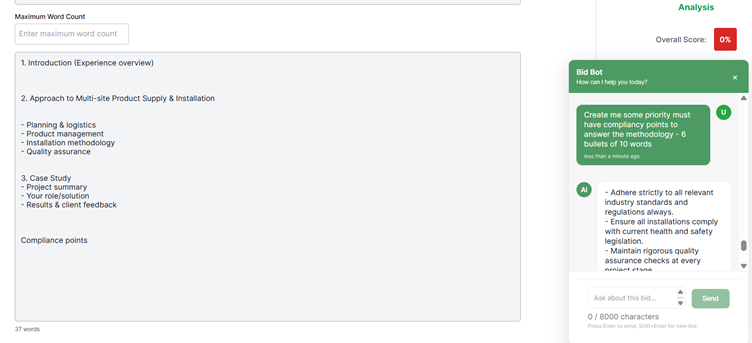
As shown in the AI Helper box below, you can either enter your own compliance points or ask the AI to generate them for you. The AI Helper interprets the question and response context to deliver the information you request, so it’s important to be clear and provide accurate instructions.
For example, you might prompt:
“Create six priority compliance points to answer the methodology section – each bullet around ten words.”
As seen in the AI helper below it has automated the compliance points so we will add them in.
Beating the Incumbent
Having spent years competing against incumbents in the tech & built environment sector, I’ve learnt the importance of considering value adds early in the process. To help with this, I often use the AI Helper for inspiration.
Example prompt:
“Based on the question and the content in the response box, can you provide key overview points to help identify what the customer’s pain points might be, or what might be preventing them from switching to a new supplier? Please remove any stars or hashtags and limit each point to around ten words.”
It’s always worth thinking about this after reviewing the customer’s documentation, so you can identify how best to position your response to outperform the incumbent (if there is one) for every response!
We’ll now insert these points into the section focusing on strategies for beating the incumbent. Remember, these insights can also help shape your win themes and value adds.
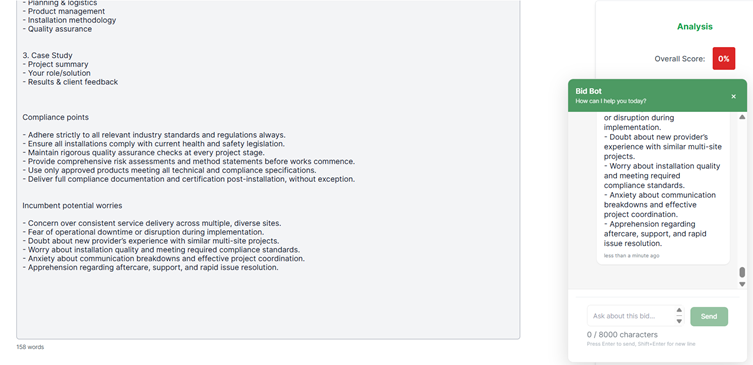
Now, moving on with the answer planning — you should now have your compliance points and potential incumbent concerns identified. These give the AI Helper greater context and help it understand your strategic angle of approach when developing the response.
WORD COUNT APPROXIMATES
Setting Word Counts for Each Section
To avoid writing excessive amounts of text in the methodology (Approach) section, it’s important to set predefined word counts for each part of your response.
As shown in the example image, the total word limit for this response is 1,000 words, which we’ve divided across each section. We’ve also allocated 100 words for value adds — we recommend value adds make up 10–15% of your total word count. This could be 10% – 100 words grouped as four strong points summarised, and then some word count backing up points throughout the response.
Evidence typically accounts for around 20% of your response. You should aim to drip-feed evidence throughout, whether that’s through case studies or references to your team’s past project experience, followed by a dedicated evidence section after your methodology.
However, since evidence is specifically requested in this question, you should consider including a higher proportion than usual.
🔥 HOT TIP – Balancing Your Key Ingredients
Our Key Ingredients analysis links directly with Requirements, Personas, and Marking Schemes. It’s essential to have all of these elements aligned and performing strongly to achieve consistently high scores across your responses.
When answer planning, I like to assign approximate word counts to each ingredient to make sure nothing is overlooked. For example, I might reserve 5% of the total word count to highlight our people, and around 20% to focus on evidence. This ensures every critical ingredient is covered and balanced within the final response.
As people often fall into a trap of writing 95% approach (of what their company does, not what the client needs) and only 5% evidence, it’s best to plan your content early. This helps avoid difficult conversations later with subject matter experts about removing sections to make space for value adds, people, and evidence.
If you do need to reduce your word count, the AI Helper is excellent for this. We’ll cover how to use it effectively in other training guides — simply search for them in the knowledge base or contact our team for support.
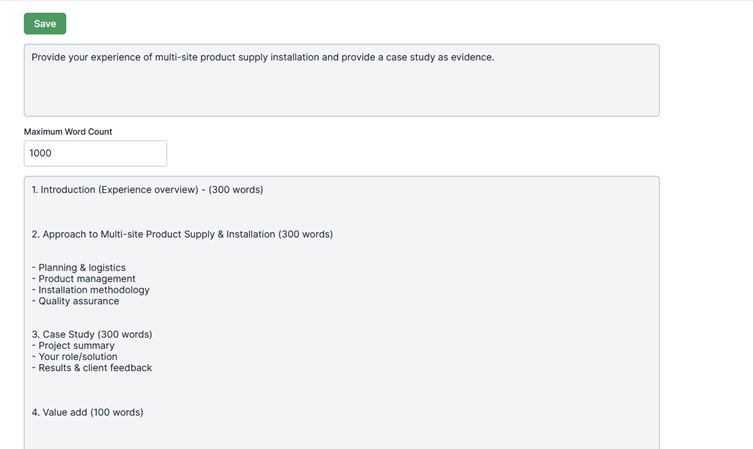
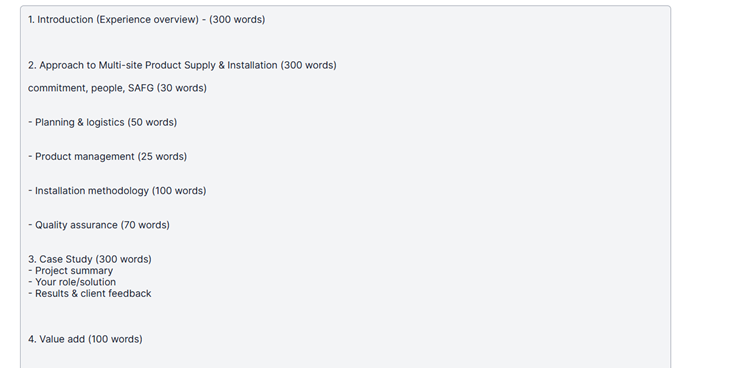
Now, using the word counts, we need to break down the Approach section and determine — based on our experience — how to allocate the words effectively (see below).
We’ve also included Commitment, People, Standards, Accreditations, Frameworks, and Guidelines (SAFG) to ensure these key ingredients, drawn from our real data analysis, are properly represented.
Remember, the elements we’ve just added total 300 words.
Populating Each Approach Section
We now need to add further detail to each part of the Approach within our answer planning.
Taking Planning and Logistics as an example — we know there’s only a limited amount of space, but breaking it down makes it much easier to manage. In this section, we’ve included People and the Approach itself: the WHAT and the HOW.
Writers often focus too heavily on what will be delivered and overlook how it will be delivered. It’s essential to understand the difference between the two — see the related module on this topic for further guidance in the knowledge library.
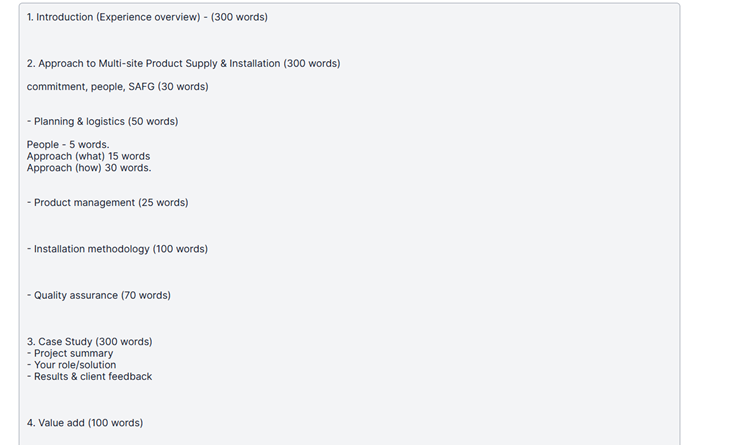
Building the Planning and Logistics Section
As shown above, we’ve allocated People – 5 words, Approach (WHAT) – 15 words, and Approach (HOW) – 30 words.
We won’t do this level of breakdown for every section, but let’s now focus on Planning and Logistics to create a more structured example.
You might prompt the AI Helper with something like:
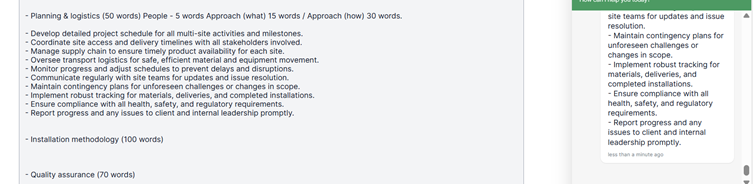
“Please write the answer plan for the Planning and Logistics section, including the overall owner of this process, and provide ten bullet points of around ten words each.”
While we know that the word count is tight for this section, it’s better to start with more content and refine it later based on AI review and human judgement. Some points may be removed if they are more relevant to the overall methodology or can be incorporated into the installation methodology instead. You can see in the image below the 10 prompted points done.
Adding the Remaining Sections
For efficiency, we’ve now added the other sections within the Approach and accompanying areas. Below, we’ve outlined the reasoning behind each addition.
How to Write the Experience Section
This section should be client-relevant and clearly demonstrate why you are the ideal choice for the contract. Focus on showcasing your knowledge, deep domain expertise, and the strengths of your people. For example, include your health and safety and risk management experience, along with an overview of projects you have successfully delivered.

The Overall Approach
Provide a clear commitment statement, identify the person overseeing delivery, and reference any relevant client, industry, or government documentation (see section 2. Approach for guidance).
At this stage, you should now have a plan or structure (sometimes called a strawman) in place. This is the ideal point to request a human review or use the platform’s automated review tools to assess your plan within seconds and identify areas for improvement.
Ensure that any missing compliance points are added, and include them in your review checklist. It’s good practice to maintain a Word document checklist to confirm all key elements have been covered before final submission.
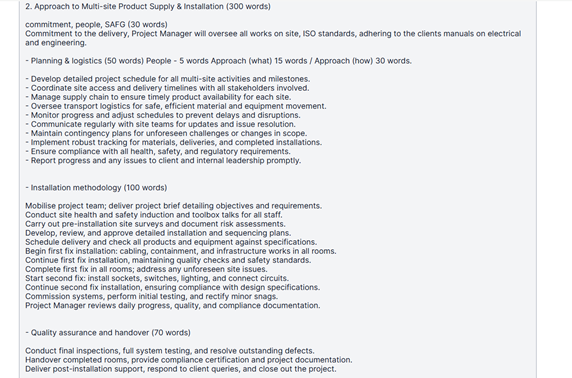
Evidence (Case Study)
The case study section below has been created as a human or AI-generated brain dump to capture initial ideas and examples.
A Quick Trick for Beating the Incumbent
Remember the incumbent’s potential worries you identified earlier? You can turn these into value-add commitments to the client — either by using the AI Helper or by developing them yourself.
Below is a quick example, but make sure you take the time to refine these ideas and discuss them with your in-house experts to strengthen your approach and make sure you can actually deliver on them!
Review time
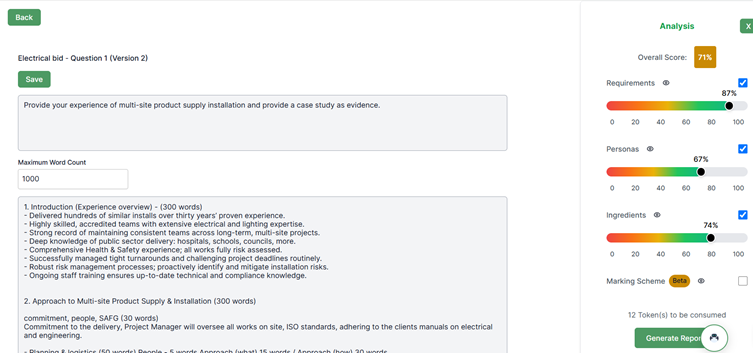
If you had uploaded your bid at the start, then the preset configurations will be there. You will see the scoring in the right panel – your scores. Click on the eye of any category and it will show you the categories, where you can then dive into the sub-categories.
Of course, we’ll need to refine each section, as much of it is still in summary format. However, this is a solid approach — it’s better to capture all the strong content first and then edit down.
We’re currently at 810 words, and I usually aim to go 10–15% over the limit initially, then reduce the word count during refinement.
Example of adding some more context
We don’t want to be adding paragraphs here – this is to use the report to see what else can be added in.
Requirements
So by clicking on the requirements eye icon, then click on report, you will see the following data below.
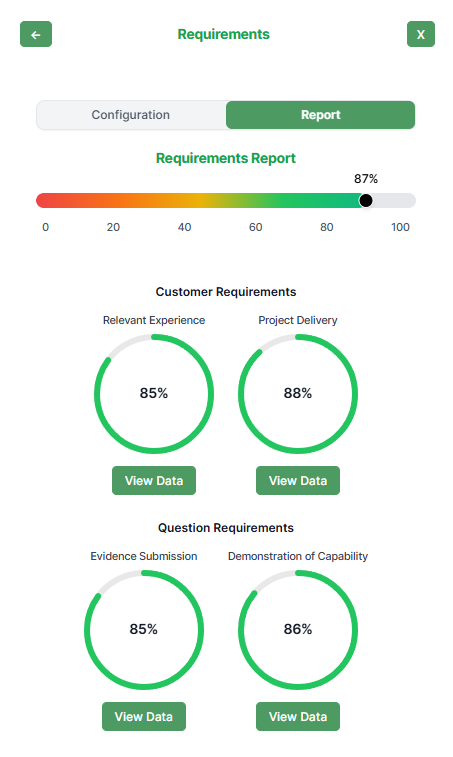
Specific category report
Then click on the view data of one of the boxes above. You will now see the image below. It will provide you with the reason of what you have done, what the response is missing, suggestions on how to improve and automated content snippets you can add in.
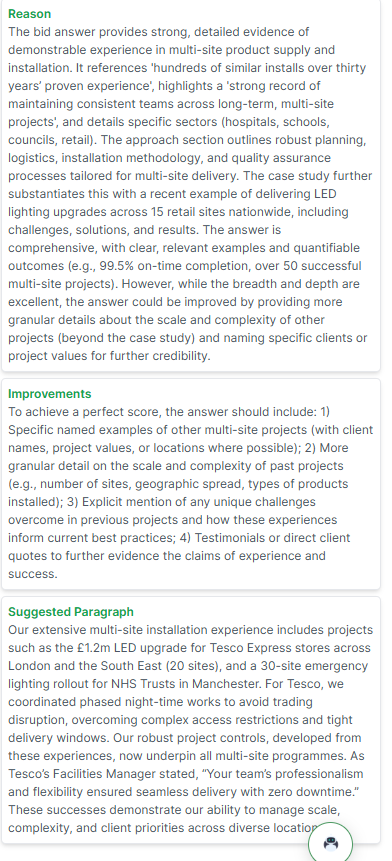
You can then use this text to add more detail to your response — either by copying and pasting sections directly or by expanding on them using your own experience.
For example, as shown in the screenshot below, we’ve enhanced the Experience Overview introduction with the following:
- Specific named examples of other multi-site projects (including client names, project values, or locations where possible).
- More granular detail on the scale and complexity of past projects (such as the number of sites, geographic spread, and types of products installed).
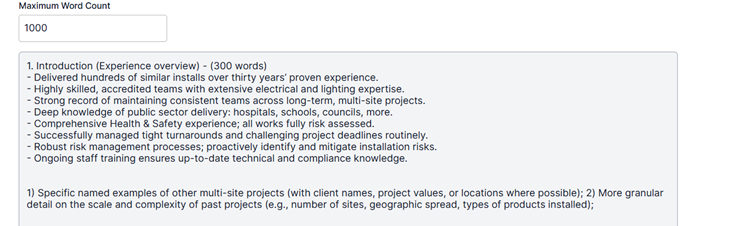
Now that you’ve added everything you feel is relevant for the structure and overall response, you’re ready for either a human review or another automated review using the platform. Once reviewed, you can begin drafting your full responses based on this structure.
You may wish to save the structure as a Word document or download the current version after clicking Save. This allows you to clear the answer box and start drafting your response from a clean slate while keeping your structure for reference.
Remember, you can use the AI Helper to build out your response quickly, or — as many users prefer — use your answer plan as a guide and draw on boilerplate content or write from your own personal experiences to develop a tailored, high-quality response.