-
Onboarding
-
I am a bid writer
- How do I create, edit and add requirements on the bid response page?
- How to upload, review and store a past bid
- Getting Started with Bid Bot
- Bidding Assistant
- How to improve a single response
- Breaking down a questions keywords - evidence & Experience episode
- How to answer plan and structure bid responses
- How to use Bid Bot to write a response from scratch
- Bid Review
- Bid Factory
-
I am a bid manager
- Bid review (Set-up) – how to set-up your bid
- How do I create, edit and add requirements on the bid response page?
- How to upload, review and store a past bid
- How to upload a set of draft responses
- Understanding Your Bid Performance
- Understanding Pay as you Go Usage and Costs
- Getting Started with Bid Bot
- Managing Organisations and Users
- Breaking down a questions keywords - evidence & Experience episode
- Viewing Your Bid
- How to answer plan and structure bid responses
- Bid Qualification
- Tender Finder
-
I am a bid reviewer
- How do I create, edit and add requirements on the bid response page?
- How to upload, review and store a past bid
- Report Generation
- Understanding Your Bid Performance
- Managing Client Feedback
- Bid Reports in PDF
- Bid Reports in Spreadsheet
- Bid Reports in Word
- Getting Started with Bid Bot
- Setting Question Importance
- Creating and Managing Ingredients (Best Practise)
- Understanding Personas
- Understanding Requirements
- Viewing Your Bid
- Requirements Review Criteria
- Bid Review
- Show Remaining Articles (1) Collapse Articles
-
I am setting up my bid
- Bid review (Set-up) – how to set-up your bid
- How do I create, edit and add requirements on the bid response page?
- How to upload, review and store a past bid
- How to upload a set of draft responses
- Working with Individual Questions
- Breaking down a questions keywords - evidence & Experience episode
- Viewing Your Bid
- How to use Bid Bot to write a response from scratch
- Bid Review
- Bid Factory
-
I am at past bid stage
-
I am at Draft Stage
- Bid review (Set-up) – how to set-up your bid
- How do I create, edit and add requirements on the bid response page?
- How to upload a set of draft responses
- Bidding Assistant
- Breaking down a questions keywords - evidence & Experience episode
- How to use Bid Bot to write a response from scratch
- Bid Factory
-
I am at the writing stage
- How do I create, edit and add requirements on the bid response page?
- Creating and Managing Marking Schemes
- Bidding Assistant
- How to improve a single response
- Breaking down a questions keywords - evidence & Experience episode
- How to answer plan and structure bid responses
- How to use Bid Bot to write a response from scratch
- Bid Factory
-
Post Feedback Stage
-
Bid Library
-
Profile
-
Organisation
-
Data Dashboards
-
Custom configurations
-
Bid Writing Academy
-
Answer Planning
Bid Qualification
Bid Qualification
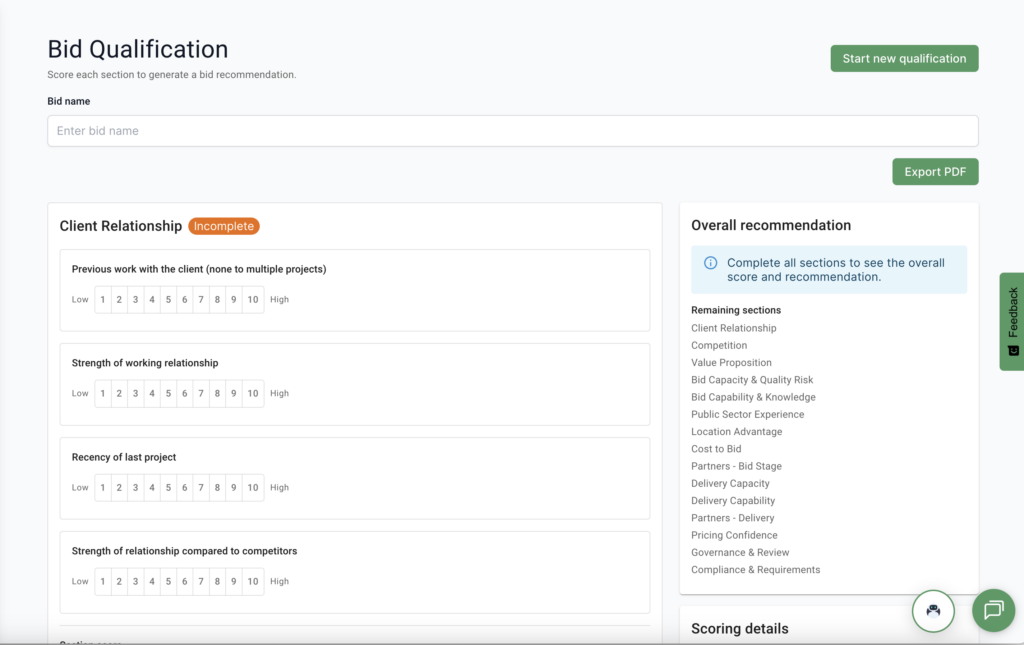
Bid Qualification helps the customer to decide whether they should go for a bid. Helping them save them time and money going for bids, they are more likely to win. We have created a feature where they can answer questions to find out.
How it works
On the BidBot Platform, we have a new page accessible on the sidebar where the customer fills out a form about the current capabilities of the company and their ability to do this bid. The following are the sections the customer will answer:
- Client Relationship
- Competition
- Value Proposition
- Bid Capacity & Quality Risk
- Bid Capability & Knowledge
- Public Sector Experience
- Location Advantage
- Cost to Bid
- Partners – Bid Stage
- Delivery Capacity
- Delivery Capability
- Partners – Delivery
- Pricing Confidence
- Governance & Review
- Compliance & Requirements
Each section contains multiple questions and is scored out of 10. You get deductions for moderate and severe scores. For severe scores, if you don’t leave a comment, you automatically fail.
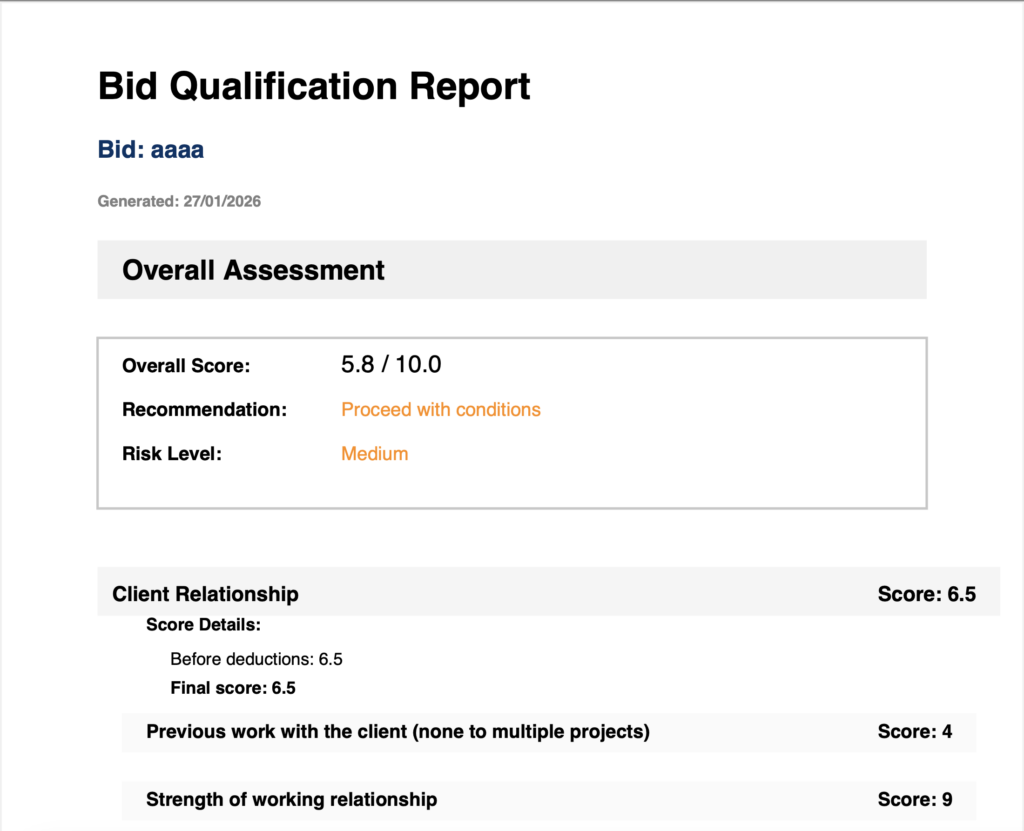
Qualification Report
Once you have completed your qualification, you can export the results by clicking on the “Export PDF” button.